Webflow vs Shopify: Direct Comparison 2026
Webflow vs Shopify in direct comparison. Design, CMS, commerce depth and transaction fees. Find out which platform fits your store.

Richard Roth
SEO & GEO Strategist
July 24, 2026
8 min read
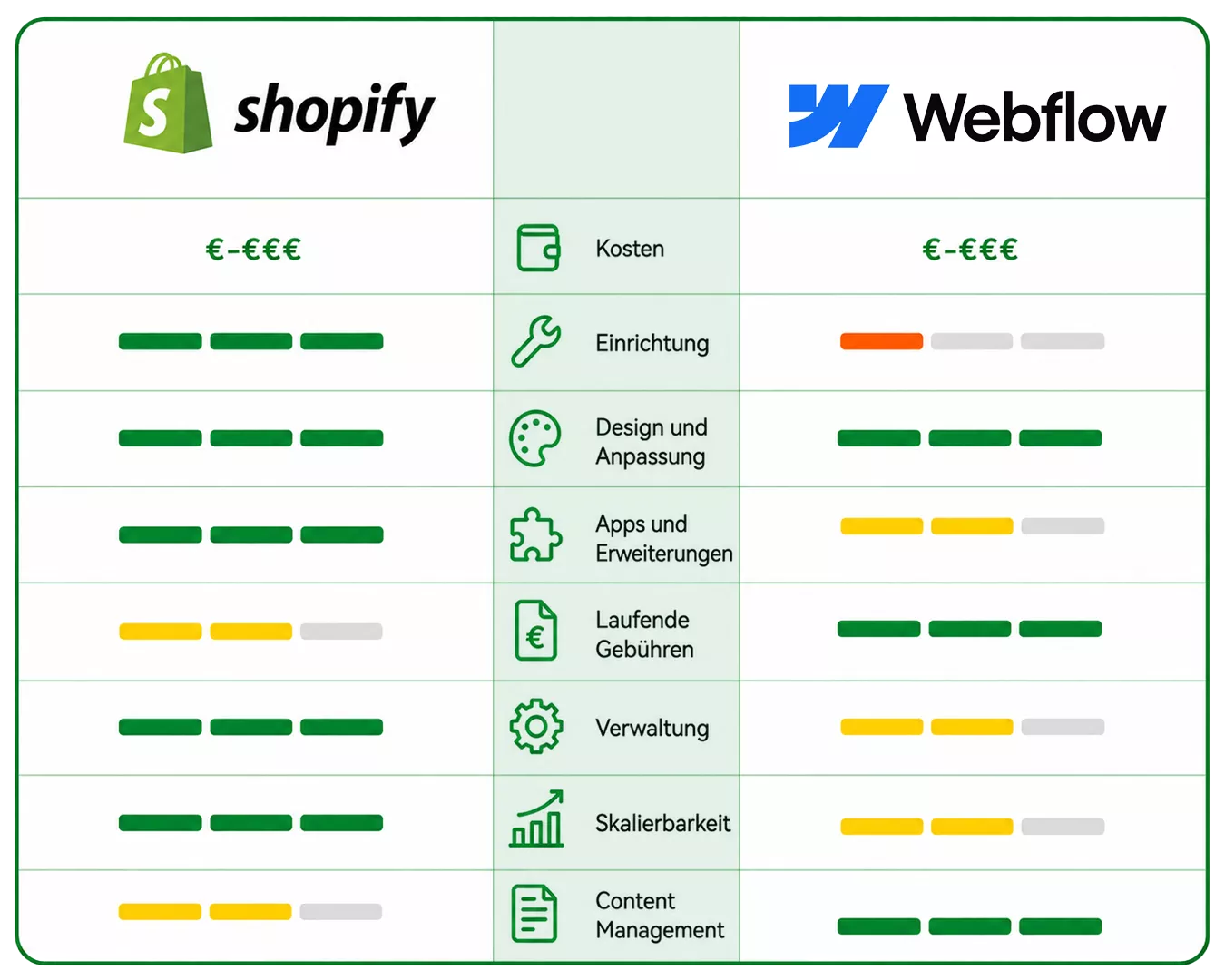
You’re facing a decision: Webflow or Shopify? Webflow is an outstanding design and CMS platform with a bolted-on shop, Shopify a specialized e-commerce platform. Both are hosted but have different focuses. We compare both from practical experience and show you what really matters in the decision. For an overview of more systems, check out our shop system comparison.
- • Webflow is a first-class design and CMS platform. But Webflow Ecommerce is intentionally kept lean, with product limits and transaction fees on the standard plans.
- • Shopify is a specialized e-commerce platform with real commerce depth, the best-converting checkout, and no transaction fees with Shopify Payments.
- • Webflow shines at design and CMS, Shopify at selling and scaling.
- • As soon as selling matters more than the website itself, Shopify gives you the depth you need, without giving up your design.
Shopify and Webflow: design/CMS platform versus commerce platform
Both platforms are hosted, but they come from different worlds.
Webflow is a tool for designers and comes from web design. It offers pixel-perfect design, an outstanding CMS with collections for dynamic content, and makes sophisticated websites possible without classic coding. That’s a genuine strength that deserves fair recognition: for marketing sites, portfolios, and content-driven brands, Webflow is one of the best platforms out there.
Shopify is built for selling from the ground up. Webflow Ecommerce is bolted onto the design platform and intentionally kept lean. As soon as e-commerce becomes your core business, you need the depth Shopify delivers.
The setup I recommend most often here isn’t either/or: keep the Webflow marketing site you love and run the actual shop on Shopify. That way you don’t fight Webflow’s product limits or its 2 percent standard-plan fee, and design stays where it’s strongest. Just make sure the two are wired up so canonical tags and redirects are clean, otherwise you split your SEO signals across both.
Cost comparison: what do you really pay?
Both work with monthly prices, but with Webflow an important factor is added.
Webflow costs
Webflow offers ecommerce plans from about $29 to $74 per month. The decisive point: on the standard ecommerce plan Webflow charges a transaction fee of 2 percent on every sale (it’s waived on higher plans). On top come product limits and a smaller commerce feature offering.
Often a Webflow designer or agency is also involved to unlock the full design potential.
Shopify costs
Shopify works with a clear pricing model. The Basic plan costs about €36 per month with annual billing, higher plans are about €105 and €384. With Shopify Payments the platform transaction fee disappears entirely.
Especially as revenue rises, the saved transaction fee makes a real difference.
Cost comparison in practice
| Cost type | Webflow | Shopify (Basic) |
|---|---|---|
| Ecommerce plan | ~$29 to $74/month | ~€36/month |
| Transaction fee | 2% on standard plan | 0% with Shopify Payments |
| Products | limited | practically unlimited |
| Commerce features | limited | full scope |
| Design & CMS | outstanding | strong |
Project Webflow’s 2 percent transaction fee onto your annual revenue. For growing shops it adds up quickly, while Shopify charges no platform fee with Shopify Payments.
Design and CMS: Webflow’s big strength
This deserves to be named clearly and fairly: on design and CMS, Webflow is outstanding.
The pixel-perfect design, the animations, and above all the CMS collections for blog, portfolios, and dynamic content are among the best on the market. If your website itself is the product or content is at the center, Webflow is hard to beat.
Shopify catches up on content significantly through blog, metaobjects, and apps, but doesn’t reach the same design freedom in the editor. The difference is: Webflow optimizes for design, Shopify for selling.
Commerce depth and product limits
Here it shows why Webflow Ecommerce hits limits quickly for serious selling.
Webflow Ecommerce has product limits and a leaner commerce data model. More complex variants, subscription models, extensive discount logic, B2B, or deep multichannel connection are not possible or only in a limited way.
Shopify brings all of this natively: practically unlimited products and variants, subscription models via apps, extensive discount engines, B2B, international sales channels, and an ecosystem of over 16,000 apps. As your range and requirements grow, you need this depth.
Checkout, transaction fees, and scaling
In the end the checkout decides your revenue.
Shopify’s Shop Pay is considered one of the best-converting checkouts in e-commerce. On top: with Shopify Payments you pay no platform transaction fee, while Webflow charges 2 percent on the standard plan. Across many orders that’s a noticeable revenue difference.
On scaling too, Shopify has the advantage: the platform carries from small shop to enterprise without you hitting product or feature limits.
SEO and content migration
Both platforms offer strong SEO fundamentals, and Webflow users often maintain their meta data particularly carefully.
Loading speed feeds into both SEO and conversion, and here Shopify has a measurable edge. In our Core Web Vitals study of shop systems, 81.8 percent of Shopify shops pass Google’s mobile thresholds against 73.4 percent on Webflow, a gap that widens once you load a design-heavy Webflow site with many products.
The important point when switching: since you keep your own domain, rankings and content are preserved. We migrate your Webflow CMS collections and blog content, including images and URLs, and cleanly redirect old paths via 301. This way you lose neither your content nor your visibility.
When is Webflow the better choice?
Webflow makes sense if you:
- Want a design- and content-driven website with high design standards
- Need a strong CMS for blog, portfolios, or dynamic content
- Run only a small shop with a manageable range
- See selling as a complement, not the core business
Webflow is a first-class choice when design and content are at the center.
When is Shopify the better choice?
Shopify makes sense if you:
- See selling as your core business and need real commerce depth
- Want to avoid the transaction fees and get the best-converting checkout
- Need unlimited products, subscriptions, B2B, or multichannel
- Want to scale and sell internationally
Shopify is the better choice as soon as e-commerce is at the center of your business.
Switching from Webflow to Shopify
Maybe you built your website with Webflow and notice that Webflow Ecommerce hits limits when selling. Switching to Shopify is then the logical step, without giving up your design or content.
The migration from Webflow to Shopify transfers products, customers, orders, and your CMS collections including the blog. We faithfully rebuild your design as a fast Shopify theme and redirect all URLs via a seamless redirect map so your rankings are preserved. You can even keep your marketing site on Webflow if you like.
With the right concept, you use the migration as an opportunity: out of the commerce limits, into real selling power, with your design and content on board. We at Store2x specialize in exactly these migrations to Shopify. If you’re considering whether a switch makes sense for you, you can request a free potential analysis.
Conclusion
Webflow or Shopify? It depends on your focus. For design and content, Webflow is one of the best platforms out there. But as soon as selling is at the center and you want commerce depth, the better checkout, and no transaction fees, Shopify is usually the better choice, without giving up your design.
 Frequently Asked Questions
 Does Webflow really charge a transaction fee?
Can I bring my Webflow design to Shopify?
Will my Webflow CMS collections be transferred?
Will my SEO rankings be preserved when switching?
Can I keep my marketing site on Webflow?
You might also like
Squarespace vs Shopify: Direct Comparison 2026
Squarespace vs Shopify in direct comparison. Design, commerce depth, checkout and scaling. Find out which platform fits your store.
Webflow Alternatives 2026: The Shop Systems Actually Worth It
Webflow alternatives compared: real selling depth with subscriptions and more payment methods, while the strong design and CMS stay. With a recommendation.
Spryker vs Shopify: Direct Comparison 2026
Spryker vs Shopify in direct comparison. Costs, complexity, composable commerce and time to market. Find out which platform fits you.