Shopify vs WooCommerce: Direct Comparison 2026
Shopify vs WooCommerce in direct comparison. Costs, pros and cons, technical requirements. Find out which system fits your store.

Richard Roth
SEO & GEO Strategist
June 11, 2026
12 min read
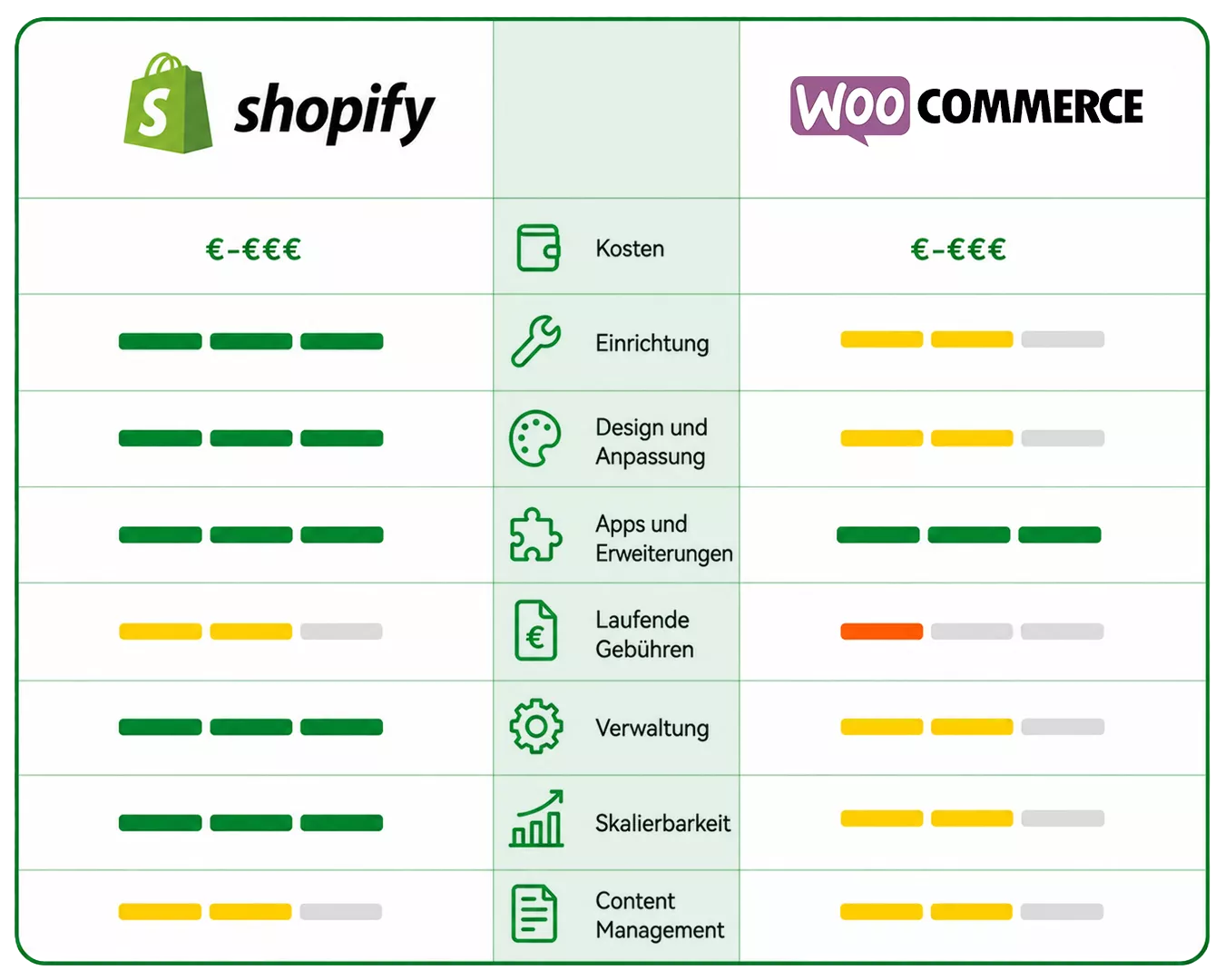
You’re facing a decision: Shopify or WooCommerce? Both systems have their merits, but depending on your situation, one is clearly the better choice for you. We compare both platforms from practical experience and show you what really matters. For an overview of more systems, check out our shop system comparison.
- • Shopify is an all-in-one system with integrated hosting and support. You pay monthly and can start immediately.
- • WooCommerce is a free WordPress plugin. You need your own hosting and technical know-how for maintenance and updates.
- • For transaction fees, WooCommerce wins because there's no platform fee. Shopify charges up to 2% extra if you don't use Shopify Payments.
- • For stores that want to scale and have little time for tech, Shopify is often the smarter choice.
Shopify and WooCommerce: Two Fundamentally Different Approaches
Before we dive into details, you should understand that Shopify and WooCommerce follow fundamentally different concepts. Shopify is a hosted platform. You sign up, choose a theme, and can start adding products. You don’t have to worry about servers, security updates, or SSL certificates.
WooCommerce is a plugin for WordPress. That means: You first need a WordPress installation on your own server. Then you install WooCommerce on top. The software itself is free, but you’re responsible for everything that happens in the background – updates, backups, server performance – that’s on you.
Sounds like more effort with WooCommerce? It is. But in return, you have full control over every aspect of your store. With Shopify, you’re bound to the platform’s rules.
Cost Comparison: What Do You Really Pay?
The cost question is complex because both systems charge differently. Let’s break it down.
Shopify Costs
With Shopify, you pay a monthly fee depending on your plan. The Basic plan currently starts at about €33 net per month with monthly billing. This includes hosting, SSL certificate, support, and the entire infrastructure.
Additionally, transaction fees apply. If you use Shopify Payments, these are based on the current Shopify Payments rates depending on country and payment type – for example, in Germany 2.9% + €0.30 per transaction on the Basic plan. If you use another payment provider like PayPal, there’s an additional platform surcharge of 2% on the Basic plan.
If you activate Shopify Payments, Shopify’s platform fees are waived. Only the respective payment provider’s fee remains.
WooCommerce Costs
WooCommerce itself is free. The costs arise elsewhere: You need hosting starting at about €10 to €30 per month for a solid server. Add costs for premium themes, plugins for additional features, and possibly developer support.
The big advantage: For payment fees, you only pay those of the payment provider itself. Stripe charges 1.4% + €0.25 for EU credit cards. There’s no WooCommerce surcharge on top.
Cost Comparison in Practice
| Cost Type | Shopify (Basic) | WooCommerce |
|---|---|---|
| Monthly base fee | approx. €33 (net) | €0 (software) |
| Hosting | included | €10 to €30 |
| Transaction fee (credit card) | 2.9% + €0.30 | approx. 1.4% + €0.25 (Stripe) |
| Platform surcharge (external payment) | 2.0% | 0% |
What this table doesn’t show: With WooCommerce, costs for premium plugins often add up. Features like subscriptions, advanced shipping rules, or invoice generation cost extra. With Shopify, many of these are available in the App Store, but many apps there are also paid.
Ease of Use: How Quickly Can You Get Started?
Shopify clearly wins here. You sign up, choose a theme, adjust colors and logo, and can add products. The interface is intuitive, everything is focused on e-commerce. From signup to finished store, you can often start in a few days to 1-2 weeks depending on your offerings.
With WooCommerce, you first need a WordPress installation. Then you install WooCommerce and configure basic settings. Just setting up payment methods, shipping options, and taxes can take a lot of time, especially if you’re not familiar with it.
This doesn’t mean WooCommerce is complicated. But it assumes you know WordPress or are willing to learn. For someone without a technical background, Shopify is the much faster path to your own store.
Store2x recommends: Shopify, because the system grows with your requirements and can be individually extended at any time. Start small and then build on a clean foundation to scale. WordPress and WooCommerce allows this too, but the system is significantly more complex.
Flexibility and Customization
A widely held opinion in the industry is that Shopify is limited and solutions like WooCommerce or Shopware require more individualization. In practice, however, this is not correct – Shopify also gives you the ability to work directly in the code and customize down to the smallest detail.
The only disadvantage with Shopify is the checkout area. This is not editable or only slightly editable for stores on Basic plans. Anyone who wants to make real optimizations in the checkout must upgrade to Shopify Plus.
Store2x recommends: Honestly consider how individual your store really needs to be. Many merchants think they need maximum flexibility, then spend months on technical customizations instead of focusing on selling. For individual features, we’re happy to provide consultation.
Themes and Design
Both platforms offer professional themes for various industries. Shopify has a curated Theme Store with a large selection, including some free options. Quality is consistently high because every theme is vetted by Shopify.
WooCommerce has access to the entire WordPress theme universe. That means thousands of options, but also very different quality levels. Not every WordPress theme is optimized for e-commerce. You need to look more carefully and check if a theme works well with WooCommerce.
In practice, many WooCommerce stores use specialized themes like Storefront, Flatsome, or Astra. These are designed for e-commerce and work reliably.
Plugins and Apps: Extending Functionality
The Shopify App Store offers over 8,000 apps for every conceivable use case. From email marketing to upselling to customer reviews – there’s a solution for almost every problem. Integration works with just a few clicks.
WooCommerce uses the WordPress plugin system. There are even more options here, but you have to check yourself whether plugins are compatible and regularly updated. Conflicts between plugins are not uncommon and can cause technical problems.
Expert tip: Less is often more. Every additional plugin with WooCommerce and every additional app with Shopify can affect loading time. Only install what you really need.
Hosting and Performance
With Shopify, you don’t have to worry about hosting. The platform runs on a global infrastructure with automatic scaling. Whether ten or ten thousand visitors simultaneously – the store stays fast, provided it was built cleanly.
With WooCommerce, performance depends on your hosting provider. Cheap shared hosting is enough for small stores but can become a problem with more traffic. For growing stores, you need managed WordPress hosting or your own server, which increases costs.
This is one of the reasons many stores switch from WooCommerce to Shopify when scaling. The technology becomes the bottleneck even though the business wants to grow.
Security and Maintenance
Shopify takes care of security updates, SSL certificates, and PCI compliance. You don’t have to do anything except choose a secure password.
With WooCommerce, the responsibility is on you. WordPress, WooCommerce, and all plugins must be regularly updated. Updates can cause compatibility issues. And if you skip an update, your store can become a target for hackers. This isn’t a theoretical risk. WordPress is a popular target because of its widespread use.
Many WooCommerce operators underestimate the maintenance effort. What starts as an hour per month can quickly become more when problems arise.
SEO and Marketing
Both platforms offer solid SEO fundamentals. You can customize meta titles and descriptions, define your own URLs, and use structured data. Depending on your store setup, you can also integrate automated rules in both systems to simplify some of the SEO work. Plugins and apps are also optionally available.
WooCommerce has a slight advantage due to the WordPress base. You can use plugins like Yoast SEO and have more control over technical SEO aspects. WordPress is also strong for content marketing because you can easily run a blog alongside your store.
Shopify has caught up here. The SEO features are sufficient for most stores. For pure content strategy, however, WordPress remains the more flexible system. Shopify focuses less on the content area but is particularly strong in product optimization. With appropriate custom coding, you also have the ability to build a high-performance content area on Shopify.
If you want to scale your Shopify store in SEO, feel free to ask us for tips or a free initial consultation.
Payment Methods and Checkout
The checkout process at Shopify is fixed and optimized for high conversion. You can customize colors and logos, but the basic structure stays the same. This sounds like a limitation but is actually an advantage in practice: The Shopify checkout has been tested and optimized over years.
With WooCommerce, you can completely customize the checkout. You decide which fields are displayed, how the process is structured, and which payment methods appear where. However, this requires technical know-how or plugins that are often paid.
For payment methods, both platforms support all common options: credit card, PayPal, Klarna, Apple Pay, Google Pay, and instant bank transfer. With Shopify, integration via Shopify Payments is easiest. With WooCommerce, you need separate plugins for each provider.
A difference often overlooked: Shopify offers Shop Pay, its own accelerated checkout option. Customers who have already purchased at another Shopify store can pay with one click. This can noticeably increase conversion rate.
Legal Requirements in Germany
For the German market, both platforms must be set up GDPR-compliant. With Shopify, servers are by default in North America, requiring additional agreements. WooCommerce can be hosted on German servers, simplifying privacy documentation.
Legal notices and cancellation policies must be manually integrated in both systems. Shopify offers apps from German providers like German Market or Trusted Shops. WooCommerce users often use plugins like Germanized that bundle the most important legal adjustments for the German market.
Important for both systems: Legal compliance is always your responsibility as a store operator. Neither Shopify nor WooCommerce take responsibility for legally compliant setup.
Support and Community
Shopify offers 24/7 support via chat and email. Quality is good, wait times usually short. Additionally, there’s a Help Center and the Shopify Learn portal with tutorials.
WooCommerce has no direct support for the free version. You rely on the community: forums, Facebook groups, and Stack Overflow. There are many helpful resources, but you have to search yourself and often adapt solutions.
For paid WooCommerce support, you need either a hosting provider with WordPress expertise or an agency.
When Is Shopify the Better Choice?
Shopify makes sense if you:
- Want to start quickly without worrying about technology
- Prefer predictable monthly costs
- Want your store to scale and focus on selling
- Have no desire or time for maintenance and updates
- Value reliable support that’s available around the clock
Shopify takes technical work off your hands. It costs monthly, but you gain time you can invest in your business.
When Is WooCommerce the Better Choice?
WooCommerce makes sense if you:
- Already have a WordPress website and want to add e-commerce
- Have technical know-how or access to a developer
- Want to minimize transaction fees
WooCommerce gives you freedom. But that freedom also means responsibility for everything that happens in the background.
Switching Between Systems
Maybe you’re already using one of these systems and wondering if a switch makes sense. It’s definitely possible but not trivial.
Migrating from WooCommerce to Shopify means: Products, customer data, and order history need to be transferred. URLs change, which leads to SEO losses without proper redirects. Plugins and custom features must be replaced by Shopify apps.
A migration isn’t a weekend project. With the right concept, you can preserve SEO rankings and even use the switch for optimizations. Without a plan, you risk traffic drops and customer frustration.
We at Store2x specialize in exactly these migrations to Shopify. If you’re considering whether a switch makes sense for you, you can request a free potential analysis.
Conclusion
Shopify or WooCommerce? The answer depends on your situation. If you want to sell quickly and don’t want to deal with technology, Shopify is usually the better choice. If you need maximum control and are technically savvy, WooCommerce can be the right platform. Both systems have their merits – but for growing stores focused on scaling, we see Shopify clearly ahead.
 Frequently Asked Questions