
Product Data Migration Explained: Switching to Shopify Without Losses
Learn how product data migration works. Switch to Shopify seamlessly without data losses and secure your revenue!

Till Täubrich
Shopify Development & Migration
June 18, 2026
10 min read

Product data migration is the structured process of transferring product information completely and error-free from one system to another, making it one of the most critical tasks for your migration to Shopify. In e-commerce, this specifically means: product names, prices, variants, images, and descriptions move securely from platforms like WooCommerce, Magento, or Shopware to Shopify.
The process is far more complex than a simple data export. Shopify requires specific CSV structures, SEO redirects must be planned seamlessly, and data losses can directly threaten revenue. Anyone who wants product data migration explained needs more than a step-by-step guide. They need an understanding of formats, pitfalls, and strategic planning.
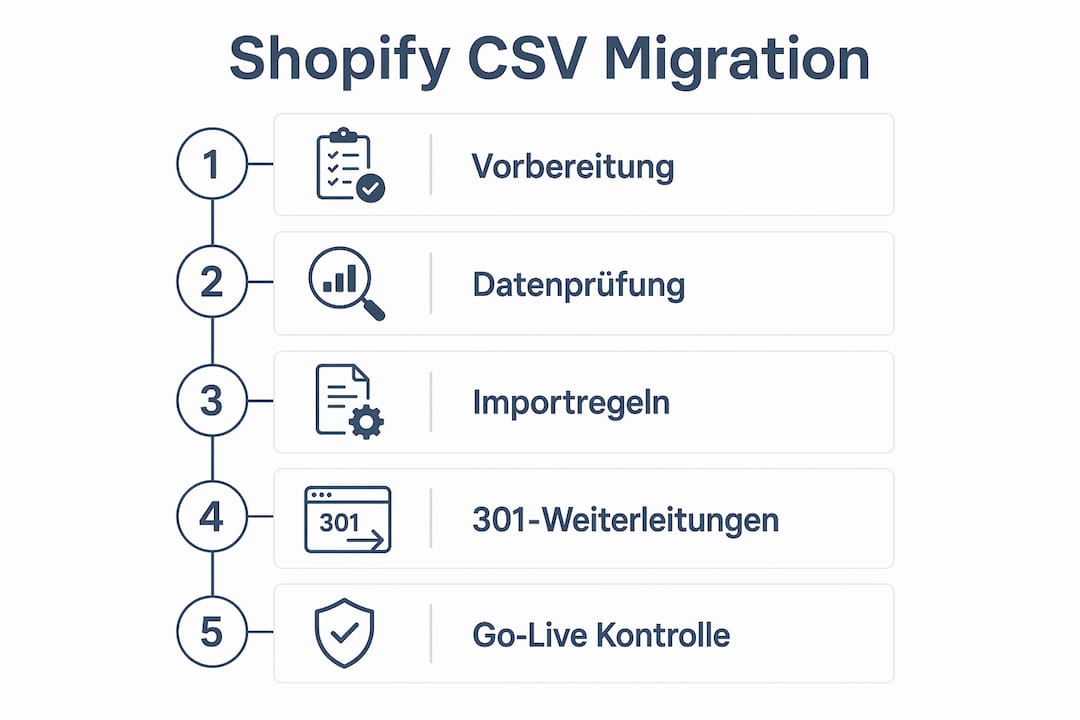
- • Pay attention to CSV structure Set handle and title fields correctly, otherwise duplicates will be created in the Shopify store.
- • Check data quality before migration Clean up missing required fields, image formats, and encoding (UTF-8) before import.
- • Plan 301 redirects completely Cover all URL types and keep redirects active for at least one year.
- • Follow the freeze plan Stop changes in the source system shortly before go-live to ensure data consistency.
- • Monitoring after go-live Perform crawls and log file analyses daily for the first two weeks.
What Does Product Data Migration Include and Why Does Data Quality Matter?
Product data encompasses far more than name and price. A complete product data set includes descriptions, technical specifications, variants, media such as images and videos, and metadata for search engines. Each of these fields has its own function and format in the target system Shopify. If even one required field is missing, Shopify will either import the product incompletely or not at all.
What many forget: Especially with complex stores, we often see meta-fields with additional data. These must not be forgotten during migration, as otherwise important information may be missing on the product page and harm SEO.
Data quality directly determines revenue. A product without an image converts worse. A missing variant description leads to customer service inquiries. Incomplete metadata costs organic visibility. These connections are often underestimated when planning a migration.

For larger assortments, using a PIM system (Product Information Management) is recommended. PIM systems serve as a central data source and ensure that product data is maintained consistently, completely, and across channels. Well-known providers like Akeneo, Pimcore, or Contentserv make it possible to clean data before migration and bring it into the right format. This significantly reduces errors during import.
The following data categories must be considered in a typical product data migration:
-
Master data: Product name, SKU, EAN, price, weight, dimensions
-
Description data: Short and long descriptions, technical specifications, usage instructions
-
Media data: Product images, videos, documents (e.g., data sheets in PDF format)
-
Variant data: Sizes, colors, materials with their own prices and inventory levels
-
SEO data: Meta titles, meta descriptions, URL handles, alt texts for images
-
Classification data: Categories, tags, collections for the Shopify structure
-
Meta-fields: Extended data such as additional product information, FAQs, reviews, etc.
Industry standards like ETIM (for technical products), BMEcat (for B2B catalogs), or XML-based formats play a role especially when data comes from ERP systems like SAP or JTL. These must be converted to CSV format before Shopify import.
How Does Shopify CSV Migration Work Technically?
The Shopify CSV import is quite simple, but errors still occur repeatedly, especially if you lack the knowledge to implement the migration correctly. Faulty CSV structures create duplicates or separate products that must be cleaned up manually. The most important rule: The handle must be identical for all rows of a product variant. The title may only be filled in the first row. If the title appears in a subsequent row, Shopify creates a new product.
The Most Important CSV Columns at a Glance
| Column | Function | Common Error |
|---|---|---|
| Handle | Unique product ID, connects variants | Different handles for the same variants |
| Title | Product name, only in row 1 | Title in subsequent rows creates duplicates |
| Variant SKU | Article number per variant | Missing or duplicate SKUs |
| Image Src | URL of the product image | Invalid URLs or missing alt texts |
| Tags | Comma-separated keywords | Special characters or spaces at the beginning |
| Published | true/false for visibility | Left empty, product remains invisible |
The file must be encoded in UTF-8. Incorrect encodings and smart quotes lead to character errors with umlauts and special characters. This particularly affects German product descriptions with Ä, Ö, Ü, and ß. A simple test: Open the CSV in a text editor like Notepad++ and check the encoding display at the bottom right.
A concrete example of correct variant setting: A T-shirt in three sizes (S, M, L) requires three rows in the CSV. All three rows carry the same handle, e.g., “t-shirt-basic-white”. Only the first row contains the title “Basic T-Shirt White”. Rows 2 and 3 leave the title field empty and only carry the variant fields.
Always test the CSV import first with a small selection of 10 to 20 products in a Shopify development store. This way you can identify formatting errors before importing the complete data set. We handle this step during migration to Shopify, so you don’t have to deal with tests and new stores.
What Role Do SEO Redirects Play in Data Transfer?
301 redirects are not an optional measure. They are the critical mechanism that prevents Google from registering hundreds of 404 errors after a migration and degrading rankings. Redirects should be completely captured before go-live, with target URLs validated and kept active for at least one year.
URL mapping planning follows a clear priority:
-
Export all URLs from Google Analytics and Google Search Console. Filter by organic traffic from the last 12 months.
-
Identify high-value pages with backlinks using tools like Ahrefs or Semrush. These URLs have the highest SEO relevance and must be redirected first.
-
Create a mapping table with old URL (source) and new Shopify URL (target). Check each target URL for accessibility.
-
Cover all URL types. Redirect maps must cover all URL types, not just home pages or top sellers. Category pages, filter pages, and blog posts will otherwise lose visibility.
-
Implement the redirects in Shopify via the “Navigation > URL Redirects” section or via CSV bulk import.
-
Validate after go-live all redirects with a crawling tool like Screaming Frog or Sitebulb.
Set up a new property for the Shopify domain in Google Search Console before going live. This way you can immediately see which URLs Google crawls after the switch and whether redirects are processed correctly.
301 redirects must remain active long-term so that Google and users are reliably redirected from old to new URLs. Anyone who deactivates redirects after six months risks renewed ranking losses because not all backlinks are updated immediately.
A frequently overlooked point: Internal links in the new Shopify store should also point directly to the new URLs. Internal links via redirects increase loading time and weaken internal link weight.
How Do You Plan a Product Data Migration Systematically?
A successful migration begins with a complete inventory. If you don’t know what you’re migrating, you can’t guarantee completeness. Analytics and Search Console analyses help capture all relevant URLs and data points and set priorities.
The following checklist covers the essential steps of product data migration:
-
Inventory: Capture all product data, categories, media, customer data, and order histories. Each object receives a status: migrate, clean, or discard.
-
Data cleaning: Remove duplicates, complete missing required fields, check image formats. Shopify recommends images with at least 2048 x 2048 pixels.
-
Define freeze plan: The freeze plan stops changes in the source system shortly before go-live. This prevents inconsistent data states between source and target systems. The freeze plan prevents inconsistent data states through controlled standstill and planned delta transfer.
-
Staging test: First import all data into a test store. Manually check product display, variant logic, prices, and media using a representative sample.
-
Rollback plan: Define before go-live under which conditions you will reactivate the old store. A rollback plan is not a defeat. It is professional risk management.
-
Go-live and monitoring: After launch, monitor crawls, log file analyses, and conversion paths daily for at least two weeks.
Crawls, log file analyses, and ranking checks after go-live are mandatory to identify problems early. A ranking drop in the first days is often not a sign of a structural problem, but of missing redirects or pages not yet crawled. Those who check daily can react quickly.
For stores with more than 500 products, using migration tools like Matrixify (formerly Excelify) or LitExtension is recommended. These tools support bulk import, validate data structures, and log errors. For complex migrations from platforms like Magento to Shopify or WooCommerce to Shopify, platform-specific peculiarities require additional manual rework.
My Assessment: Migration Is an Investment, Not a Mandatory Exercise
I regularly experience entrepreneurs viewing product data migration as a tedious technical obligation. This is an expensive mistake. A cleanly executed migration is the moment when you clean up, structure, and future-proof your data foundation once and for all.
What always surprises me: Most migration problems don’t arise during the import itself, but beforehand. Poor source data, missing variant logic, and incomplete media are the real cost drivers. Those who save here pay later with manual rework and revenue losses from faulty product pages.
The complexity of a Shopify switch is systematically underestimated. A store with 1,000 products and three variants each has 3,000 CSV rows, all of which must be correctly structured. Add redirects, SEO data, and media. This is not an afternoon project. This is a process that requires experience, tools, and clear responsibilities.
My recommendation: Invest the time in clean inventory and data cleaning before you import even one row. And get support from experts who have gone through this process many times. The costs of professional migration are almost always lower than the costs of a failed one.
 Frequently Asked Questions